Stores & services
Belfast, Victoria SquareStoresSephora Belfast, Victoria SquareVictoria Square, Bridge St, Belfast, BT1 4QGView All Hours +Change your storeYour favourite store allows you to see services available and book appointments
In-Store ServicesMake-up and skincare services, Benefit BrowBar, gifting and personalisation workshop, Sephora offers you a whole range of services to come and discover in store Make an appointment
(Belfast, Victoria Square)See Belfast, Victoria Square store servicesView all stores- Account / Sign-in
Good morning
Log in or create an account to benefit from all the
benefits of the Sephora Beauty Account
Log in/ register

 0
0

- Welcome (Account)
- Back
- Brands
- New & Trending
- Christmas
- Hair Offers
- Makeup
- Fragrance
- Skincare & SPF
- Hair
- K Beauty
- Body
- Sephora Collection
- Offers
- MY SEPHORA












- Sephora
- Skincare
- Tools & Accessories
- stylpro 2-in-1 Light Up Sonic Dermaplane One Size


Close
stylpro2-in-1 Light Up Sonic Dermaplane
£34.99
Product Description
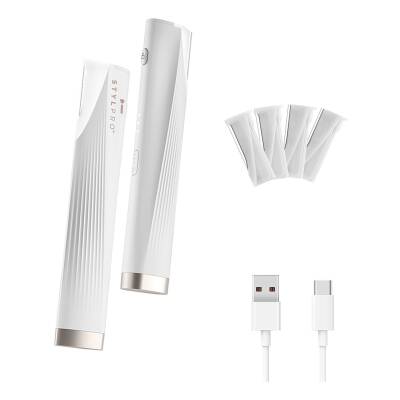
The STYLPRO Light Up Sonic Dermaplane uses sonic vibrations to ensure a closer dermaplane to the skins surface, while the LED light ensures no hairs are missed.
Directions
CHARGING
1.\tPlug the USB-C charging cable (provided) into the USB port, plug the other end into a USB-C friendly power source.
2.\tThe three LED lights will slowly flash on the side of the device when charging. Once the device is fully charged the three LED lights will remain on.
BLADES
1.\tThe STYLPRO Light Up Sonic Dermaplane comes with two different types of blades. One type for using on your face and one type for more precise areas, such as eyebrows. There are four blades in total, two of each type.
2.\tTake your required blade and line up with the device, gently push the blade into the device until you hear a click.
3.\tTo replace or change the blade, simply press the Unlock Button on the side of the device and the blade will pop up. Carefully remove the blade from the device.
HOW TO USE
Facial Dermaplaning:
1.\tEnsure skin is cleansed, makeup free and hydrated before use.
2.\tOnce you have secured your facial dermaplane blade, long press the On/Off Button to turn on the device. One LED light will illuminate on the side of the device.
3.\tShort press the On/Off Button once to increase the sonic vibration intensity to mode 2. Two LED lights will illuminate.
4.\tShort press the On/Off Button twice to increase the sonic vibration intensity to mode 3. Three LED lights will illuminate.
5.\tAlways start on mode 1. Hold the device at a 45° angle against your skin. This ensures optimal contact and a comfortable experience.
6.\tGently glide the device over the areas you wish to eliminate unwanted hairs. You do not need to press hard.
Eyebrow Dermaplaning:
1.\tEnsure skin is cleansed, makeup free and hydrated before use.
2.\tOnce you have secured your eyebrow dermaplane blade, long press the On/Off Button to turn on the device. One LED light will illuminate on the side of the device.
3.\tShort press the On/Off Button once to increase the sonic vibration intensity to mode 2. Two LED lights will illuminate.
4.\tShort press the On/Off Button twice to increase the sonic vibration intensity to mode 3. Three LED lights will illuminate.
5.\tAlways start on mode 1. Hold the device at a 45° angle against your skin in the area that requires hairs trimming.
6.\tGently glide the device over the areas you wish to eliminate unwanted hairs to tidy up eyebrows or facial hair. You do not need to press hard.
Once you have finishing dermaplaning or trimming, long press the On/Off Button to turn off the device. We recommend to discard of the used blade after use.
Ingredients
1 x STYLPRO Light Up Sonic Dermaplane
4 x Blades (2 x Face, 2 x Eyebrow)
Protective Bag
1 x USB-C Charging Cable
See more...
Free Delivery & Returns*
for ALL My Sephora Members*
*Find out more about our wide range of delivery options.
Premier Delivery Offer
12 months next day delivery for only £9.95
Find out more about Premier Delivery
10% off
Save on your 2 favourite brands - for life
Login to your account to select your brands.
MySephora
Where points mean perks
Sign up today and get the perks you deserve. Find out more.
Receive Sephora's news and offers!
Subscribe to our newsletter to enjoy all the benefits.
Email*
Help & Information
About
More From Sephora
Country Settings
United Kingdom- 4.2★★★★★★★★★★
Download the Sephora App