Stores & services
Belfast, Victoria SquareStoresSephora Belfast, Victoria SquareVictoria Square, Bridge St, Belfast, BT1 4QGView All Hours +Change your storeYour favourite store allows you to see services available and book appointments
In-Store ServicesMake-up and skincare services, Benefit BrowBar, gifting and personalisation workshop, Sephora offers you a whole range of services to come and discover in store Make an appointment
(Belfast, Victoria Square)See Belfast, Victoria Square store servicesView all stores- Account / Sign-in
Good evening
Log in or create an account to benefit from all the
benefits of the Sephora Beauty Account
Log in/ register

 0
0

- Welcome (Account)
- Back
- Brands
- New & Trending
- Christmas
- Hair Offers
- Makeup
- Fragrance
- Skincare & SPF
- Hair
- K Beauty
- Body
- Sephora Collection
- Offers
- MY SEPHORA















- Sephora
- Makeup
- Tools & Accessories
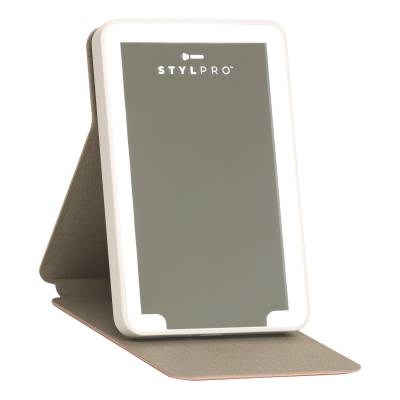
- stylpro LED Mini Mirror


Close
stylproLED Mini
£16.99
Product Description
STYLPRO LED Mini Mirror is a lightweight, slimline, and portable mirror, lined with LED light panels for the perfect for touch ups on the go.\tGlimpse & Glow.
Achieve flawless beauty anywhere with the STYLPRO LED Mini Mirror. This compact, portable mirror is perfect for makeup, grooming, and touch-ups on the go.
With LED lighting and a sleek design, this mirror offers bright, even illumination in any setting. Lightweight and stylish, it's your essential beauty tool for anywhere you go.
Achieve flawless beauty anywhere with the STYLPRO LED Mini Mirror. This compact, portable mirror is perfect for makeup, grooming, and touch-ups on the go.
With LED lighting and a sleek design, this mirror offers bright, even illumination in any setting. Lightweight and stylish, it's your essential beauty tool for anywhere you go.
Directions
1. To turn the light on slide the On/Off Switch at the back of the mirror.
2. To turn the light off slide the On/Off Switch at the back of the mirror.
How to Change the Batteries:
1. Ensure the Mirror is switched off.
2. On the back of the Mirror you'll find the battery compartment.
3. Using a small cross-head screwdriver, carefully unscrew the battery compartment.
4. Remove all batteries. Note their orientation. See correct disposal of old batteries below.
5. Insert 4x new CR2032 batteries into the compartment, ensuring they are correctly aligned with the \\\\+\\\\ and \\\\-\\\\ markings. Resecure the Compartment Cover using a screwdriver to tighten the screw, ensuring it is snug, do not overtighten.
Composition
mirrorIngredients
1x STYLPRO LED Mini Mirror
4x 3V Lithium Cell Batteries
See more...
Free Delivery & Returns*
for ALL My Sephora Members*
*Find out more about our wide range of delivery options.
Premier Delivery Offer
12 months next day delivery for only £9.95
Find out more about Premier Delivery
10% off
Save on your 2 favourite brands - for life
Login to your account to select your brands.
MySephora
Where points mean perks
Sign up today and get the perks you deserve. Find out more.
Receive Sephora's news and offers!
Subscribe to our newsletter to enjoy all the benefits.
Email*
Help & Information
About
More From Sephora
Country Settings
United Kingdom- 4.2★★★★★★★★★★
Download the Sephora App